Java Scanner class allows the user to take input from the console. It belongs to java.util package. It is used to read the input of primitive types like int, double, long, short, float, and byte. It is the easiest way to read input in Java program.
Syntax
Scanner sc=new Scanner (System.in);
The above statement creates a constructor of the Scanner class having System.in as an argument. It means it is going to read from the standard input stream of the program. The java.util package should be import while using Scanner class.
It also converts the Bytes (from the input stream) into characters using the platform's default charset.
Methods of Java Scanner Class
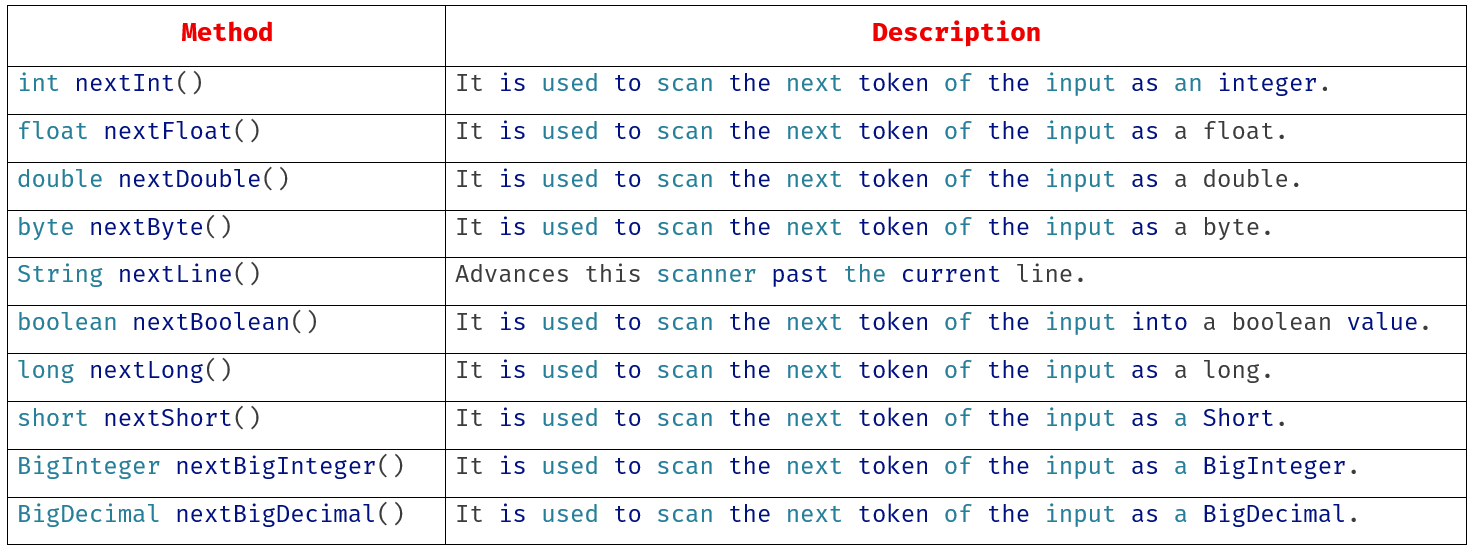
Java Scanner class provides the following methods to read different primitives types:
Example 1:
import java.util.*;
class UserInputDemo
{
public static void main(String[] args)
{
Scannersc=new Scanner(System.in); // System.in is a standard input stream
System.out.print("Enter first number- ");
int a=sc.nextInt();
System.out.print("Enter second number- ");
int b=sc.nextInt();
System.out.print("Enter third number- ");
int c=sc.nextInt();
int d=a+b+c;
System.out.println("Total= "+d);
}
}
Example 2:
import java.util.*;
class UserInputDemo1
{
public static void main(String[] args)
{
Scanner sc=newScanner(System.in); // System.in is a standard input stream
System.out.print("Enter a string: ");
String str=sc.nextLine(); // reads string
System.out.print("You have entered: "+str);
}
}