Whether you're a student writing "Hello World" or a pro managing a massive enterprise codebase, there's a specific tool for you.
Here are the most common IDEs used for Java programming today:
1. The "Big Three" (Industry Standards)
IntelliJ IDEA
Often considered the "gold standard" by professional developers. It is known for its deep understanding of code logic and high-level productivity features.
- Best For: Professional enterprise development, Spring Boot, and complex projects.
- Key Features: Smart code completion, advanced refactoring, and excellent built-in support for build tools like Maven and Gradle.
- Versions: Community Edition (Free) and Ultimate Edition (Paid, includes advanced web/framework support).
Eclipse
The veteran of the Java world. It’s a classic, open-source workhorse that dominated the industry for decades and remains a top choice due to its massive plugin ecosystem.
- Best For: Large-scale enterprise projects and developers who want a fully customizable, 100% free environment.
- Key Features: Highly extensible via thousands of plugins; excellent for managing multi-module projects and cross-language development (C++, Python, etc.).
Apache NetBeans
The "official" IDE for Java (as it is now maintained by the Apache Foundation). It provides a more straightforward, "out-of-the-box" experience compared to Eclipse.
- Best For: Desktop applications (Swing/JavaFX) and beginners who want all features pre-installed.
- Key Features: Excellent GUI builder (drag-and-drop), built-in support for Java EE, and early access to the newest Java version features.
2. The Modern Contender
Visual Studio Code (VS Code)
While technically a text editor, it becomes a powerful, lightweight IDE when you install the "Extension Pack for Java" by Microsoft.
- Best For: Full-stack developers who switch between languages and those who want a fast, modern interface.
- Key Features: Fast startup times, cloud-native development support, and a massive library of extensions.
3. Specialized & Educational IDEs
If you are just starting or have a very specific goal, these niche tools might be better:
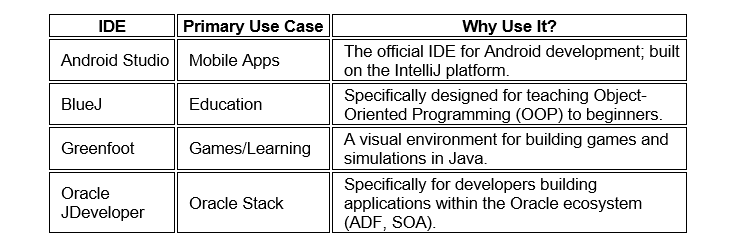
If you’re a beginner: Start with NetBeans (easier setup) or BlueJ (if you're learning OOP from scratch).
If you want to be a Pro: Download IntelliJ IDEA Community. It’s the industry favorite for a reason.
If you have an older computer: Try VS Code; it's much lighter on RAM than the full IDEs.