String class
There is no primitive type for strings in Java, but there is the predefined class (type) String.
In Java, string is basically an object that represents sequence of char values. An array of characters works same as Java string.
For example:
char[] ch={'j','a','v','a','t','p','o','i','n','t'};
String s=new String(ch);
is same as:
String s="javatpoint";
The Java String class represents an immutable sequence of characters and is a fundamental part of the java.lang package, which means it is automatically available in all Java programs. Immutability means that once a string object is created, its value cannot be changed; any operation that appears to modify it actually returns a new string object.
Key Characteristics
Immutability. Once a String object is created, its value cannot be changed. Any "modification" actually creates a new String object.
String Pool. To save memory, Java stores unique string literals in a special memory area called the String Constant Pool.
Creation
Strings can be created using string literals or the new keyword.
Using string literal (most common)
String greeting = "Hello, World!";
Using the new keyword (explicitly creates a new object in the heap)
String anotherString = new String("Java String");
Concatenation
String concatenation joins two or more strings. The two primary methods are:
The + Operator: This is the simplest and most common method. It is overloaded to work with strings and can concatenate strings with other data types (which are converted to strings via their toString() method).
String firstName = "John";
String lastName = "Doe";
String fullName = firstName + " " + lastName;
// Result: "John Doe"
String sentence = "My name is " + firstName + " and I am " + 25 + " years old.";
// Result: "My name is John and I am 25 years old."
The concat() Method: This method appends a specified string to the end of the current string and returns a new String. It only accepts string arguments and will throw a NullPointerException if the argument is null.
String part1 = "First String ";
String part2 = "Second String";
String combined = part1.concat(part2);
// Result: "First String Second String"
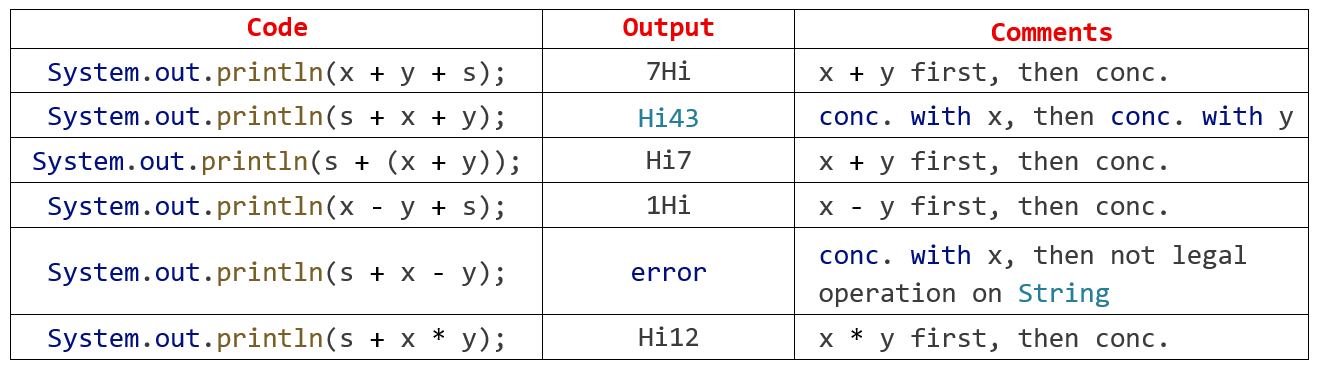
This table illustrates how Java handles operator precedence and
string concatenation (based on variables where x = 4, y = 3, and s = "Hi").
Java String Concatenation and Precedence
In Java, string is basically an object that represents sequence of char values. An array of characters works same as Java string.
For example:
char[] ch={'j','a','v','a','t','p','o','i','n','t'};
String s=new String(ch);
is same as:
String s="javatpoint";
The Java String class represents an immutable sequence of characters and is a fundamental part of the java.lang package, which means it is automatically available in all Java programs. Immutability means that once a string object is created, its value cannot be changed; any operation that appears to modify it actually returns a new string object.
Key Characteristics
Immutability. Once a String object is created, its value cannot be changed. Any "modification" actually creates a new String object.
String Pool. To save memory, Java stores unique string literals in a special memory area called the String Constant Pool.
Creation
Strings can be created using string literals or the new keyword.
Using string literal (most common)
String greeting = "Hello, World!";
Using the new keyword (explicitly creates a new object in the heap)
String anotherString = new String("Java String");
Concatenation
String concatenation joins two or more strings. The two primary methods are:
The + Operator: This is the simplest and most common method. It is overloaded to work with strings and can concatenate strings with other data types (which are converted to strings via their toString() method).
String firstName = "John";
String lastName = "Doe";
String fullName = firstName + " " + lastName;
// Result: "John Doe"
String sentence = "My name is " + firstName + " and I am " + 25 + " years old.";
// Result: "My name is John and I am 25 years old."
The concat() Method: This method appends a specified string to the end of the current string and returns a new String. It only accepts string arguments and will throw a NullPointerException if the argument is null.
String part1 = "First String ";
String part2 = "Second String";
String combined = part1.concat(part2);
// Result: "First String Second String"
This table illustrates how Java handles operator precedence and
string concatenation (based on variables where x = 4, y = 3, and s = "Hi").
Java String Concatenation and Precedence
Most Used Methods
Here are some of the most frequently used methods to keep in your toolkit:
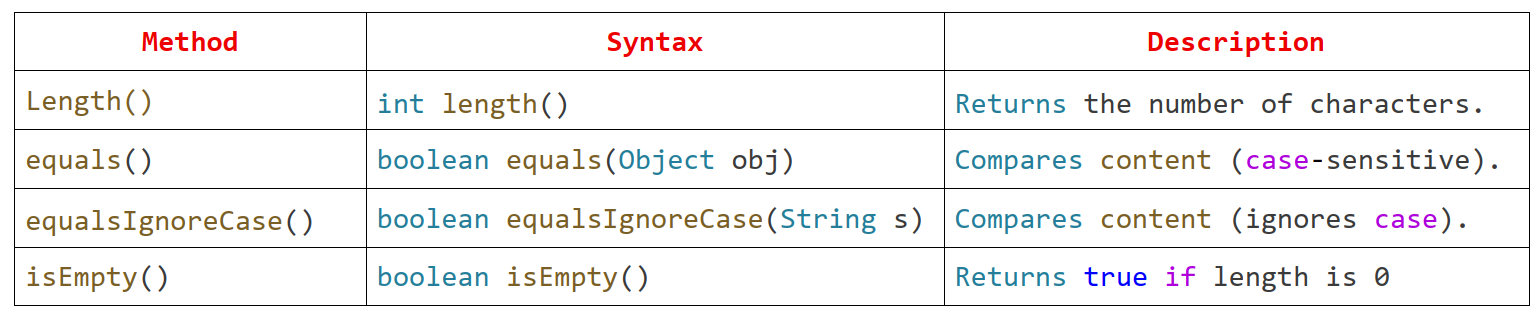
1. Basic Information & Comparison
Example:
String str = "Java";
System.out.println(str.length()); // Output: 4
System.out.println(str.equals("java")); // Output: false
System.out.println(str.equalsIgnoreCase("java")); // Output: true
2. Transformation & Formatting
These are your "bread and butter" for cleaning up user input or preparing data for display.
toUpperCase() / toLowerCase()
Converts the entire string to the specified case.
Syntax: String toUpperCase()
Example: "Hello".toUpperCase(); → Output: HELLO
trim()
Removes leading and trailing whitespace (very useful for form data).
Syntax: String trim()
Example: " Hi ".trim(); → Output: Hi
replace()
Replaces all occurrences of a specified character or sequence.
Syntax: String replace(char old, char new)
Example: "Java".replace('a', 'o'); → Output: Jovo
3. Searching & Extraction
Use these when you need to "dig into" a string to find specific parts.
charAt()
Returns the character at a specific index (starting from 0).
Syntax: char charAt(int index)
Example: "Code".charAt(1); → Output: o
indexOf()
Returns the index of the first occurrence of a character or substring. Returns -1 if not found.
Syntax: int indexOf(String str)
Example: "Coffee".indexOf("fee"); → Output: 3
substring()
Extracts a portion of the string. Note that the "endIndex" is exclusive.
Syntax: String substring(int beginIndex, int endIndex)
Example: "Programming".substring(0, 4); → Output: Prog
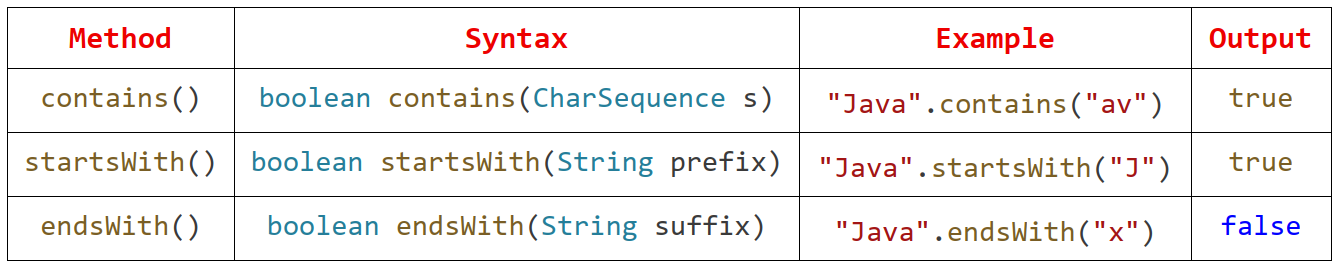
4. Checking Content
Tip:
When comparing strings in Java, always use .equals() instead of ==. The == operator checks if the objects are at the same memory location, while .equals() checks if the actual text is the same.